Scientific Calculator - Java GUI Application
Versatile calculator with basic and scientific modes, featuring ANS button and I/P display
Technologies Used
Scientific Calculator - Java GUI Application
Overview
A versatile calculator built in Java that toggles between basic and scientific modes. Features include displaying previous answers (ANS), showing both input and output (I/P), and smooth switching between modes for enhanced user experience.
Problem Statement
Standard calculators often lack:
- Mode Flexibility: Limited to either basic or scientific functions
- Memory Features: No easy way to reuse previous calculations
- Visual Feedback: Input and output not clearly separated
- User Experience: Clunky interfaces without modern design
Solution
This Java calculator provides:
- Dual Mode Operation: Toggle between Basic and Scientific modes
- ANS Functionality: Store and reuse previous calculation results
- I/P Display: Show both input expression and calculated result
- Intuitive GUI: Clean, user-friendly interface built with Java Swing
Key Features
1. Mode Toggle System
- Basic Mode: Essential arithmetic operations (+, -, ×, ÷)
- Scientific Mode: Advanced functions (sin, cos, tan, log, ln, √, ^)
- Smooth Transition: Instant switching between modes
- Context Preservation: Maintains calculation state when switching
2. ANS (Answer) Button
- Stores the result of the last calculation
- Can be used in subsequent calculations
- Persists across mode switches
- Eliminates need to re-enter previous results
3. I/P (Input/Output) Display
- Input Line: Shows the mathematical expression being entered
- Output Line: Displays the calculated result
- Clear Separation: Distinct visual separation between input and output
- Real-time Updates: Output updates as expression is built
4. Comprehensive Function Set
Basic Mode Functions
- Addition, Subtraction, Multiplication, Division
- Decimal point handling
- Percentage calculations
- Clear and backspace operations
Scientific Mode Functions
- Trigonometric functions (sin, cos, tan)
- Inverse trigonometric functions (asin, acos, atan)
- Logarithmic functions (log, ln)
- Exponential functions (e^x, 10^x)
- Power functions (x², x³, x^y)
- Square root and cube root
- Factorial calculations
- Pi and Euler's number constants
5. User Interface Design
- Clean, modern interface using Java Swing
- Responsive button layout
- Clear visual hierarchy
- Intuitive color scheme
- Keyboard-friendly design
Technical Implementation
Architecture
Java Swing GUI → Calculator Engine → Mathematical Functions
                              ↓
                    Result Storage (ANS)
Technologies Used
- Language: Java 8+
- GUI Framework: Java Swing
- Mathematics: Java Math library
- Event Handling: ActionListener and Event Dispatch Thread
- Layout Management: GridBagLayout and BorderLayout
Core Components
GUI Structure
public class Calculator extends JFrame {
    private JTextField inputField;      // Shows input expression
    private JTextField outputField;     // Shows calculated result
    private JButton[] numberButtons;    // 0-9 digit buttons
    private JButton[] operatorButtons;  // +, -, *, / buttons
    private JButton[] scientificButtons; // sin, cos, log, etc.
    private JButton modeToggleButton;   // SCI/BSI toggle
    private JButton ansButton;          // ANS functionality
}
Calculation Engine
public class CalculatorEngine {
    private double lastResult;          // Stores ANS value
    private String currentExpression;   // Current input expression
    private boolean scientificMode;     // Current mode state

    public double evaluateExpression(String expression) {
        // Parse and evaluate mathematical expression
        // Handle operator precedence
        // Support scientific functions
        return result;
    }

    public double applyScientificFunction(String function, double value) {
        // Apply trigonometric, logarithmic, etc. functions
        switch(function) {
            case "sin": return Math.sin(Math.toRadians(value));
            case "cos": return Math.cos(Math.toRadians(value));
            case "tan": return Math.tan(Math.toRadians(value));
            case "log": return Math.log10(value);
            case "ln": return Math.log(value);
            case "sqrt": return Math.sqrt(value);
            // ... more functions
        }
    }
}
Mode Toggle Implementation
private void toggleMode() {
    scientificMode = !scientificMode;
    if (scientificMode) {
        // Show scientific buttons
        showScientificButtons();
        modeToggleButton.setText("BSI");
        setTitle("Scientific Calculator");
    } else {
        // Show basic buttons
        showBasicButtons();
        modeToggleButton.setText("SCI");
        setTitle("Basic Calculator");
    }
    // Preserve current calculation state
    updateDisplay();
}
Screenshots
Basic Calculator Mode
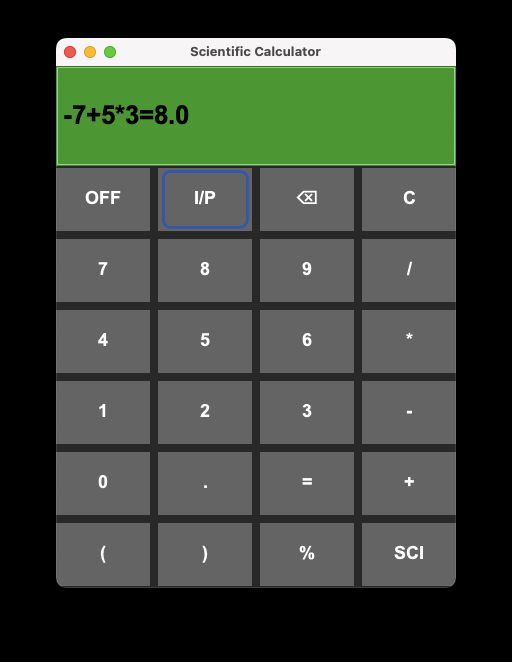
This is the default view with essential arithmetic functions. Click the SCI button to switch to scientific mode and unlock advanced features.
Scientific Calculator Mode
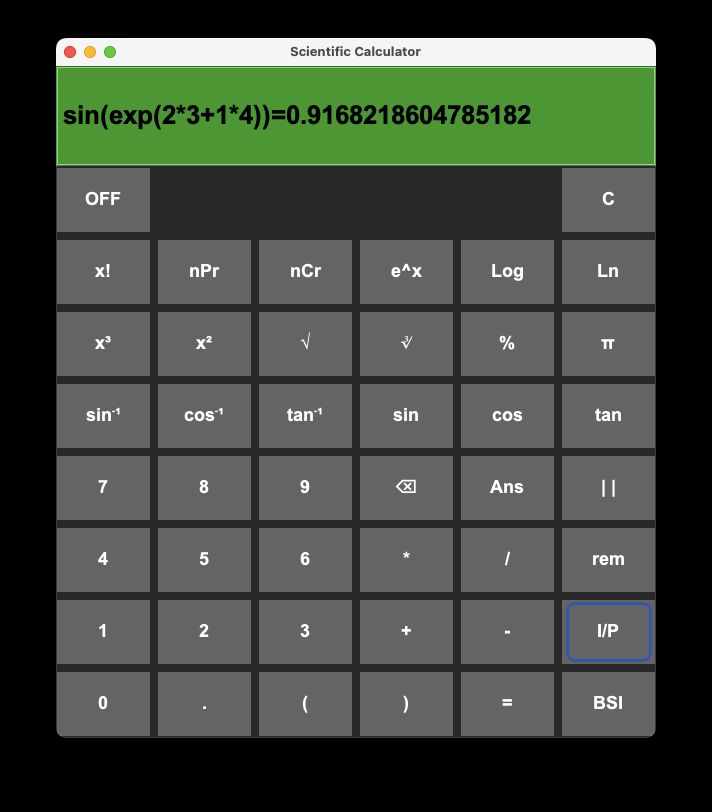
The scientific mode includes trigonometric, logarithmic, and power functions. Click the BSI button to return to the basic mode.
Key Features Implementation
ANS Button Functionality
private void handleAnsButton() {
    if (lastResult != 0) {
        String ansValue = String.valueOf(lastResult);
        inputField.setText(inputField.getText() + ansValue);
        updateOutput();
    }
}
Expression Evaluation
private void calculateResult() {
    try {
        String expression = inputField.getText();
        double result = evaluateExpression(expression);
        outputField.setText(String.valueOf(result));
        lastResult = result;  // Store for ANS functionality
    } catch (Exception e) {
        outputField.setText("Error");
    }
}
Scientific Function Handling
private void handleScientificFunction(String function) {
    try {
        double value = Double.parseDouble(inputField.getText());
        double result = applyScientificFunction(function, value);
        outputField.setText(String.valueOf(result));
        lastResult = result;
    } catch (NumberFormatException e) {
        outputField.setText("Invalid Input");
    }
}
Challenges & Solutions
Challenge 1: Expression Parsing
Problem: Parsing complex mathematical expressions with proper operator precedence
Solution: Implemented recursive descent parser with proper precedence handling
Challenge 2: Mode State Management
Problem: Maintaining calculation state when switching between modes
Solution: Created state preservation system that saves and restores calculator state
Challenge 3: Scientific Function Accuracy
Problem: Ensuring trigonometric and logarithmic functions return accurate results
Solution: Used Java's built-in Math library functions with proper angle conversions
Challenge 4: GUI Responsiveness
Problem: Interface becoming cluttered with too many buttons
Solution: Implemented dynamic button visibility based on current mode
Results & Impact
- ✅ Successfully implemented dual-mode calculator
- ✅ ANS functionality working across mode switches
- ✅ I/P display providing clear input/output separation
- ✅ All mathematical functions tested and verified
- ✅ Clean, professional GUI design
- ✅ Completed as Java mini-project requirement
Usage Examples
Basic Calculations
Input:  2 + 3 * 4
Output: 14

Input:  15 / 3 + 2
Output: 7
Scientific Calculations
Input:  sin(30)
Output: 0.5

Input:  log(100)
Output: 2.0

Input:  2 ^ 3
Output: 8.0
ANS Functionality
Calculation 1: 5 + 3 = 8
ANS now contains: 8

Calculation 2: ANS * 2 = 16
Input:  ANS * 2
Output: 16
Project Timeline
Duration: January 2024 - March 2024 (3 months)
- Month 1: Basic calculator implementation
- Month 2: Scientific functions and mode toggle
- Month 3: ANS functionality, I/P display, and final testing
Educational Value
This project demonstrates:
- Java GUI Development: Swing framework usage
- Event-Driven Programming: Action listeners and event handling
- Mathematical Computation: Expression parsing and evaluation
- State Management: Preserving application state
- User Experience Design: Creating intuitive interfaces
Future Enhancements
- Add more scientific functions (hyperbolic, statistical)
- Implement calculation history
- Add keyboard shortcuts
- Support for complex numbers
- Unit conversion capabilities
- Graphing functionality
- Save/load calculation sessions
- Mobile app version
Technical Specifications
- Java Version: JDK 8 or higher
- GUI Framework: Java Swing
- Platform: Cross-platform (Windows, macOS, Linux)
- Dependencies: None (uses standard Java libraries)
- Packaging: Runnable JAR file
Installation & Usage
Prerequisites
- Java Runtime Environment (JRE) 8 or higher
- Java Development Kit (JDK) for compilation
Running the Application
# Compile the Java files
javac Calculator.java CalculatorEngine.java

# Run the application
java Calculator
JAR File Creation
# Create manifest file
echo "Main-Class: Calculator" > manifest.txt

# Create JAR file
jar cfm Calculator.jar manifest.txt *.class
Testing
Unit Tests
- Expression evaluation accuracy
- Scientific function correctness
- ANS functionality
- Mode toggle behavior
Integration Tests
- GUI component interactions
- Mode switching scenarios
- Error handling
- Edge cases
Conclusion
This Scientific Calculator project successfully demonstrates the implementation of a feature-rich calculator application in Java. The dual-mode functionality, ANS button, and I/P display provide a superior user experience compared to standard calculators. The project serves as an excellent example of Java GUI development and mathematical computation implementation.
Project Status: Completed ✅ GitHub: View Repository Tech Stack: Java, Swing, Mathematics Features: Dual Mode, ANS Button, I/P Display, Scientific Functions